PatternForge
A tracker workstation, and a fairly long detour into the music software I wish I had been able to use.
Listen to eight finished tracks made in PatternForge.
I've been making music on computers for years. I started in FL Studio 12, moved to Ableton, and then began wandering backwards through older ways of working: FastTracker, Renoise, modular analogue simulators and other odd tools. I like finding out how a particular interface changes the music I end up making.
PlayerPRO stayed in my head for a long time. In particular, the video of Aphex Twin playing the Vordhosbn project showed an arrangement spread across tracker, instrument, sample and mixer windows. I wanted to try that workflow. Getting the old software running comfortably on a modern machine was another matter.
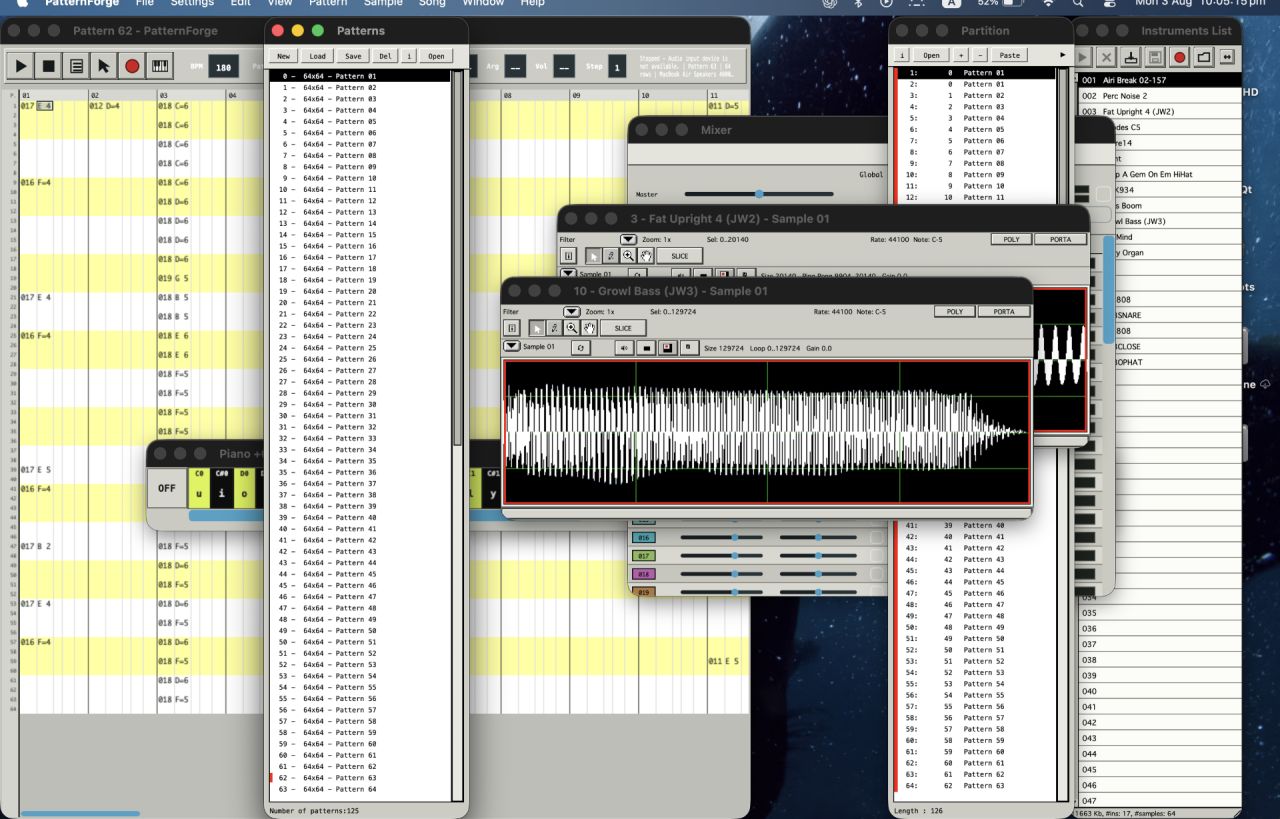
Getting from a reference to something I could make music in
PatternForge began as an attempt to recreate the immediacy of that older software. I put together a detailed build guide, used the original PlayerPRO source as reference material, and worked with AI coding tools to develop it. The first version mostly amounted to a tracker window with basic sample loading and playback. The look, the window behaviour and the workflow were still a long way from what I wanted.
There was a lot of iteration after that. This is an AI-assisted project, and I was open about that in the original writeup. The part I brought to it was a very particular idea of how I wanted to compose, an existing familiarity with music software, and a willingness to keep using the result until the missing or awkward parts became obvious.
The application is written in C++20 with JUCE 8. It has grown into a much larger environment than the first tracker window, while keeping the dense, separate-window approach that attracted me to the reference.
What it can do
- 64-channel hexadecimal tracker sequencing and pattern-based track arrangement.
- Persistent MIDI keyboard input, step recording and external MIDI sequencing.
- Polyphonic multisample instruments with envelopes, filters and portamento.
- Automatic transient slicing and chromatic drum mapping.
- A destructive waveform editor with an Offline FX workbench: preview, compare, then Bake.
- Convolution reverb with custom impulse-response loading, plus eleven optional CDP processes for spectral, granular, waveset and segment processing.
- Real-time mixer inserts including chorus, shimmer reverb, compression, EQ and tempo-synchronised delay.
- An oscilloscope tuner for external analogue hardware.
- Real-time recording that combines the internal track and a live hardware input into one stereo master.
That last workflow was something I particularly wanted. PatternForge can sequence a hardware synth while playing the internal arrangement, show the incoming level and waveform during recording, and then let me listen, scrub, keep or discard the take before choosing its filename. It is a concrete example of building around the way I want to work with an instrument.
CDP and the weird FX workbench
The sample editor's offline processing deserves more than a line in the feature list. I wanted to take a sound, do something unreasonable to it, hear the result, and bake it straight into the sample I was composing with. Composers' Desktop Project gives that workflow a much deeper collection of transformations to draw from.
CDP is a separate suite of command-line sound-processing programs. PatternForge's integration exposes eleven selected Release 8 processes through the Offline FX workbench: Spectral Blur, Noise, Scatter, Suppress, Average, Trace, Drunk and Step Freeze, plus Waveset Average, Granular Brassage and Segment Scramble. These cover changes to a sound's frequency content, movement through time, tiny waveform cycles, grains and larger chunks.
The workflow is simple to follow while making music. Choose the whole sample, a selection or a slice; choose a processor; adjust its controls; audition the result and compare it with the original. Bake commits the rendered audio as one undoable edit. After that, it is a sample I can trim, pitch, sequence or process again. With unchanged settings and source audio, baking reuses the preview, which matters when a random process produces something I want to keep.
Underneath, PatternForge runs an externally installed CDP in the background. Spectral jobs pass through analysis, processing and resynthesis before the result returns to the editor. The integration handles cancellation, checks the output before committing it, and keeps that work away from the audio playback thread. CDP needs to be installed separately; it is not bundled with PatternForge.
The integration notes describe the implementation. On the music page I go further into what the effects do, why the render-and-bake approach appeals to me, and the Aphex Twin connection that makes this particular software rabbit hole so interesting. There are also audio examples: an original sound and six CDP transformations, plus a rhythm before and after Segment Scramble.
Why the old software matters to me
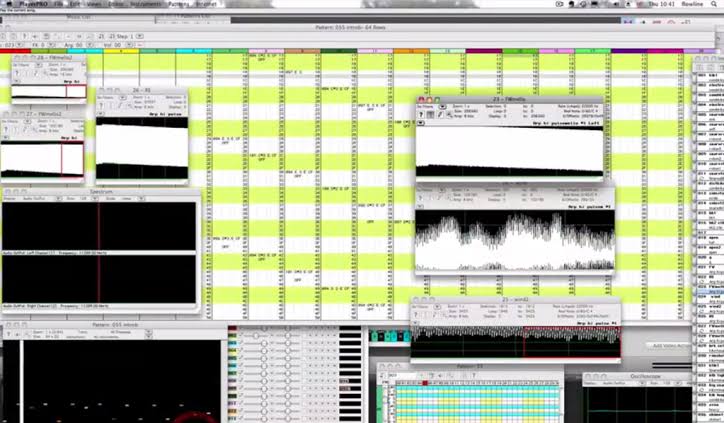
There is something compelling about seeing a complicated piece of music in a limited, highly specific tool. It makes me want to understand the decisions that led to the result. The tracker format exposes timing, notes and effects as data in a way that feels quite different from dragging clips around a timeline.
That does not mean the interface creates the music for you. I said as much in the original post. But the way a program encourages you to navigate, edit and repeat things has a real influence on the ideas you follow. I wanted to explore that influence with a tool I could change.
On the engineering side, the project has involved audio-thread safety, project persistence, MIDI routing, sample processing and native macOS interface behaviour. An audio application needs to keep playing reliably while the person using it opens windows, changes sounds and edits the track. That makes dependability part of the creative experience.
PatternForge is still pre-release software with rough edges. It has nevertheless reached the point where I can actually make music with it, which was the reason for building it in the first place. It is an independent project inspired by classic trackers, with no affiliation to PlayerPRO or its original developers.
Feature post and repository link · Original long-form writeup · Afterimage, another audio project
More about the music behind this project: my process, influences, instruments and the history that keeps me interested, including Aphex Twin's experiments with unusual music software.