Music
I make electronic music, and I have a fairly unreasonable interest in the machinery involved. A sound leads to a question about how it was made. That leads to an old program, a sampler manual, a synthesis technique, or occasionally an entire software project. This is how wanting to try a particular tracker ended up becoming PatternForge.
I'm obsessed with IDM, especially Aphex Twin and Squarepusher. That runs into jungle, drum and bass, techno, the peculiar behaviour of samplers, and the way a few notes can change completely when you put them through a different instrument. I like music that makes me want to stop what I'm doing and work out what the hell just happened. The Neutron, 808 and 909 drum sounds, distortion, plate reverb and odd modular connections all belong in that picture.
This page is the longer version: the music, the process, and the tools that keep pulling me further into it.
Listen along: finished tracks · a rhythm cut into pieces · six CDP transformations · distortion and reverb in different orders · Afterimage patches.
How I got here · Aphex Twin · The strange software · Squarepusher and IDM · Breaks and sampling · CDP, weird FX and baking sounds · Jungle and DnB · Techno and acid · The Neutron and hardware · Distortion and plate reverb · Building instruments · Further reading
Finished tracks
Eight full-length tracks I made in PatternForge. Pick one below.
Download Track 1 (M4A, 12.9 MB).
Download Track 2 (M4A, 11.0 MB).
Download Track 3 (M4A, 10.7 MB).
Download Track 4 (M4A, 8.6 MB).
Download Track 5 (M4A, 22.4 MB).
Download Track 6 (M4A, 14.9 MB).
Download Track 7 (M4A, 12.1 MB).
Download Track 8 (M4A, 7.1 MB).
FL Studio, Ableton, then backwards
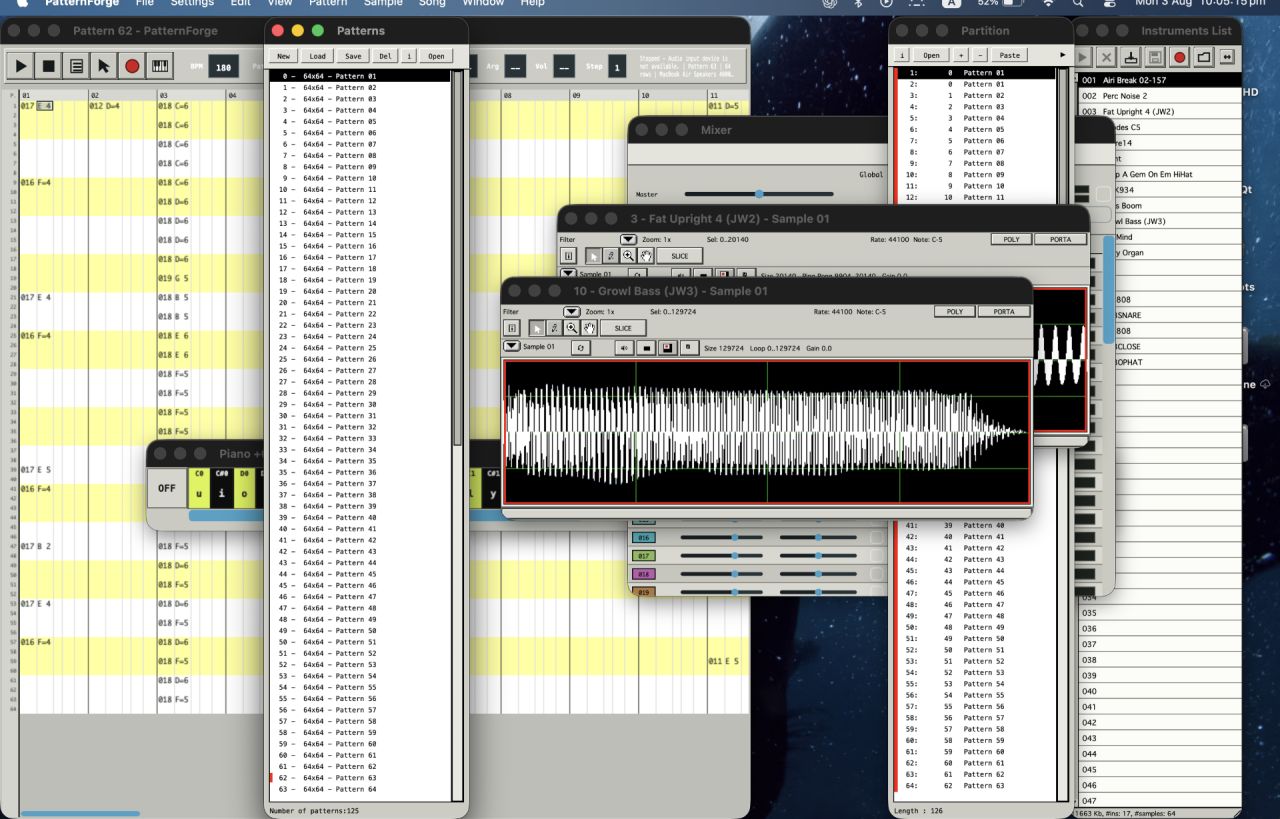
I started making tracks in FL Studio 12 and moved to Ableton. From there I began digging into FastTracker, Renoise, modular analogue simulators and other less obvious ways of arranging sound. The older tools kept raising interesting questions. Why enter music in a column of numbers? Why split everything across separate windows? Why commit an effect to a sample when a modern machine can keep a long chain of plugins running?
A piano roll makes the shape of a melody immediately visible. A tracker puts the note beside its instrument number, volume and effect commands. That changes what is easy to notice. A tiny variation can sit right beside the event it changes. You can look down a pattern and follow the decisions row by row. There is something very satisfying about that density, even when the first impression is a spreadsheet having a nervous breakdown.
I still like the speed and familiarity of FL Studio and Ableton. Exploring trackers has also shown me how much an interface directs my attention. If a program makes it effortless to repeat a pattern, I need to think about what changes on the next pass. If editing the sample is right there beside the sequence, the sound itself becomes part of writing the phrase.
That was the appeal of PlayerPRO. The tracker, arrangement, instrument editor and waveform windows could all be on screen together. I wanted to work in that particular mess of windows on a current machine. PatternForge grew out of that very specific itch.
Aphex Twin, Drukqs, and that PlayerPRO video
Drukqs is a cornerstone record for me. I wrote about it when I first explained PatternForge, and it is worth spending more time on here. The attraction is the range: intricate, almost unreasonable drum programming sitting alongside piano pieces with an entirely different sense of space. It gives me a lot to think about as someone making music and as someone interested in how computers work.
With Vordhosbn, I keep coming back to how the melody holds its place while the percussion seems to be changing direction underneath it. There is a tune to follow even when the arrangement gets dense. That balance interests me more than complexity on its own. A ridiculous amount of editing still has to leave something worth listening to.
The video showing the Vordhosbn project in PlayerPRO has stayed in my head for years. You can see an arrangement, instruments, samples and a mixer. Hearing the record and then seeing those ordinary editable parts is quite a moment. It turns a mysterious finished thing into a set of decisions someone actually made.
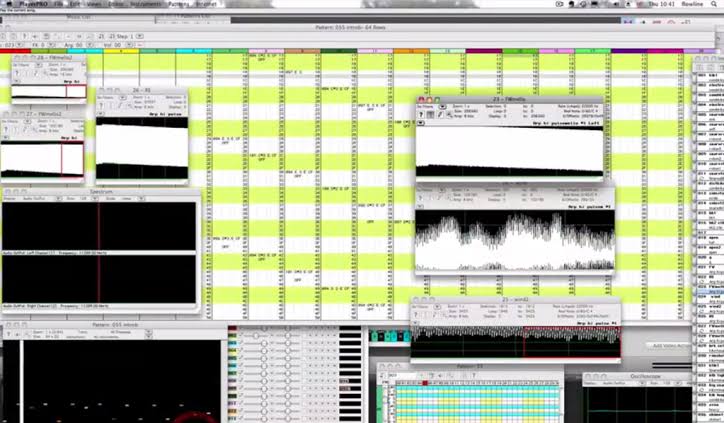
I had to get past the tempting idea that using the same software would somehow give me the same music. What I wanted to borrow was the opportunity to think in a different way: keep the arrangement visible, get close to the samples, make small changes quickly and hear their consequences. The interesting question became what I would make once I could work like that.
There is a much wider appeal in Aphex Twin's music too. A melody can be tender while the sound around it is abrasive or strange. A machine can be very obvious in the recording and still produce something deeply personal. Those are qualities I want to explore in my own work. The official Drukqs release page is a better starting point than a list of supposedly essential bits of gear.
Aphex Twin and the strange software
Part of my fascination with Aphex Twin is following a sound back to the tools behind it. I can hear an edit and wonder how it was done, then find myself looking at a program whose entire approach to sound is unfamiliar. Some of these tools ask you to draw. Others ask for commands, numbers, or code. Learning what those controls mean is part of the attraction. Suddenly there are things to try that would never have occurred to me while looking at a piano roll.
Painting sound in MetaSynth
MetaSynth is one of the stranger tools associated with the Windowlicker EP.[1] The idea behind its Image Synth is wonderfully direct: a picture becomes a set of instructions for making sound. In MetaSynth's own description, horizontal position determines when something happens, vertical position determines pitch, brightness controls amplitude, and colour controls stereo placement.
That means a visual edit can also be a musical edit. A line can describe a pitch moving through time. Fading a shape changes its loudness; changing its colour moves it across the stereo field. I like the thought of working on the shape of a sound that way, then rendering it and hearing which parts of the picture mattered. It is the sort of interface that makes me want to open the manual and start trying things.
CDP, then back into a tracker
CDP is another part of Aphex Twin's software history, particularly in accounts of Bucephalus Bouncing Ball.[1] An ordinary recording can be pulled apart and transformed until its timing, tone and texture become material for something else. The CDP section below gets into the processes I have brought into PatternForge.
That is the part I want within reach while composing. I can hear a sound, render a transformation, keep a useful fragment and put it back into a pattern. PatternForge's preview and Bake workflow gives me a way to carry on from the result. The next note can use the newly processed sample immediately; I can hear what it does to the phrase instead of judging it entirely in isolation.
The Vordhosbn project in PlayerPRO brings that curiosity back to the arrangement. Seeing the notes, samples and channels laid out gives me something concrete to study. A complicated passage becomes a series of small choices about timing, pitch and which sound should happen next.
Custom instruments, speech and drawing
The wider trail of tools connected to Aphex Twin includes SuperCollider, Praat and UPIC.[1] Each offers a different way into sound. A music-making environment can become very personal when the musician can change the software itself, or find a musical use for something built for another purpose.
SuperCollider provides a programming language and a real-time synthesis engine. You can describe sound generation and musical behaviour in code. That interests me for the same reason building an instrument does: I want to understand what is producing the result and be able to change the parts that matter to me.
Praat comes from phonetics. It can analyse, synthesise and manipulate speech, including its pitch and duration. Those capabilities are interesting to think about as musical operations. A voice has a pitch contour, a changing tone and a rhythm already inside it; there is a lot to work with before it ever becomes a conventional melody or sample phrase.
Then there is UPIC, developed by Iannis Xenakis and his collaborators, which used drawing to control digital sound synthesis. It takes the question back another step: what should composing on a computer look like in the first place? A keyboard, a page of notation, a tracker column, a drawing and a patch cable each give the hand a different way into the sound.
There are actual ideas here to take away and test: different representations of sound, different ways to edit time, and different points at which to stop adjusting controls and commit a recording. My route through FL Studio, Ableton, trackers, CDP and hardware keeps throwing up those questions. PatternForge gives me somewhere to work on a few of them.
Squarepusher and the IDM obsession
Squarepusher is another recurring reference point. What gets me is the feeling that a musical idea can be pushed almost to breaking point and still have a groove inside it. The bass, the percussion and the edits can all demand attention. I like trying to follow how they fit, then listening again and finding something else happening underneath.
IDM is a slightly ridiculous name, but it is useful shorthand for a lot of music I care about. I am drawn to the detailed programming, the unexpected sounds, the abrupt changes, and the moments where something beautiful appears in the middle of all that activity. Aphex Twin and Squarepusher make me want to listen closely and then go and make something.
There is a physical side to this obsession. A drum can have a tiny, precise attack and then dissolve into a huge ugly tail. A bass sound can be almost unrecognisable in isolation and make complete sense once the rhythm comes in. That sends me towards experiments with synthesis and effects: find a sound, push it around, record what happens, and see whether some part of it belongs in a track.
I like the point where the process starts surprising me. The sequence is still something I wrote, but the patch or the processing is doing more than I expected. Then I have something to react to. That back-and-forth is a big part of the music I want to make.
What happens inside a break
A drum break carries a lot of information before you touch it: the drummer's timing, the softer hits between the main beats, the room, the decay of a cymbal over the next snare. Cutting it into pieces creates a musical problem as well as an editing problem. How much of that original movement do you keep? Which pieces can you move without flattening the groove?
The details I care about are often small. A slice that starts just before the transient feels different from one cut exactly on it. Leaving a little of the previous sound attached can make a sequence hang together. A short retrigger can become a roll; a different sample offset can turn the same recording into another instrument. The little sounds between the obvious kick and snare are often where the rhythm gets its character.
Pitch and playback speed are another part of the appeal. With ordinary sample playback, speeding the recording up also raises its pitch and shortens it. Slowing it down makes the attack and room sound stretch out together. Time-stretching separates duration from pitch, with a different set of artefacts. Both approaches are useful when the result is chosen by ear. Renoise exposes these decisions directly through its sample properties and beat-sync controls.
Then there is resampling: turn an edited or processed sound into a fresh piece of audio and work on that. A reverb tail becomes something you can reverse. A bass phrase can be cut into smaller movements. A carefully constructed sound can be pitched somewhere its original instrument was never meant to go. Each pass gives you something new to respond to.
For me, the useful test is whether a change makes the phrase better when the whole thing is playing. A spectacular sound on its own can take up every available space in an arrangement. Sometimes shortening it, removing a layer or leaving a gap gives the next event somewhere to land. A break needs room to breathe, even when it is moving very quickly.
Hear the cuts
Here is a short, synthesised test rhythm at 168 BPM, followed by the same audio put through CDP's Segment Scramble. The second version takes pieces between 45 and 260 milliseconds long and joins them in a new order. Listen for what happens to the space between the kicks, snares and hats.
CDP, weird FX, and baking the damage into the sample
CDP, the Composers' Desktop Project, is a big part of this interest in pulling sounds apart. It is a collection of sound-processing programs with a command-line workflow: give a program a source file, an output filename and some parameters, let it render, then listen to what came back. You can feed that result into another process. A fairly ordinary recording can end up several transformations away from anything you would recognise.
The history goes back to 1986, with early work on the Atari ST and roots in the computer-music community around York. Trevor Wishart's sound-transformation work became central to the system. I like that background: composers wanted to do particular things to sound, so they built the machinery to do them. The resulting catalogue has some wonderfully specific ideas buried in it.
The connection to Aphex Twin's software experiments interests me because it leads somewhere practical: an unfamiliar sound can send me towards a process I can investigate and try on my own material.
Some CDP processes work directly on audio; others first analyse it into a changing picture of its frequencies and their amplitudes. The spectral processors change that data, then resynthesise it into audio. That gives you access to the inside of a sound: soften its attacks, hold parts of its spectrum still, pick out the strongest components, or wander through its changing texture. The CDP spectral guide explains that side of it.
The weird FX inside PatternForge
This is the weird FX side of PatternForge: bringing a selection of those processors into the sample editor, close to the material I am actually using in a track. The current integration has eleven CDP processes, alongside the built-in offline effects. CDP Release 8 is installed separately; PatternForge handles running it and bringing the audio back. I get controls I can adjust and a result I can audition without having to assemble each command by hand.
One sound, six different ways to pull it apart
Start with the original below, then compare the processed versions. Each is roughly eight seconds long and uses the same excerpt from the Afterimage instrument preview, mixed to mono. These are actual offline CDP renders made for this page, with playback levels adjusted for comparison. The controls let you replay or scrub through any part.
A few examples from PatternForge's selection of CDP processes:
Spectral Blur softens attacks and smears changes over time. A sharp sound can lose its edges and become something much more diffuse.
Blur — listen to the start and decay of each note. Spectral Trace keeps the strongest spectral components. This version keeps eight at each analysis frame. Spectral Suppress works in the other direction, removing the strongest components to expose different details.
Trace — a reduced version of the original spectrum. Spectral Drunk takes a random walk through the analysed sound. Spectral Step Freeze holds the spectrum at intervals. Both let the movement inside the recording become part of the experiment.
Drunk — wandering through the source's changing texture. Step Freeze — holding each spectral snapshot for a quarter of a second. Waveset Average averages groups of small waveform cycles, changing the texture through a form of distortion. This version uses groups of seven.
Waveset Average — the waveform itself is being reshaped. Granular Brassage rebuilds the source from grains, with controls for their size, density, pitch and position scatter. Here the grains range from 35 to 95 milliseconds, with pitch scattered up to seven semitones either way.
Brassage — little pieces of the source, overlapped and scattered. Segment Scramble works on larger chunks. The rhythm comparison above lets you hear that one.
The remaining choices are Spectral Noise, Spectral Scatter and Spectral Average. There is plenty to explore within those eleven before getting anywhere near the rest of CDP. These are the processes exposed by PatternForge's CDP integration, so they are also a useful starting point for finding the relevant manuals.
Preview it, bake it, then keep going
In PatternForge's Offline FX workbench, I can target the whole sample, a selection or the current slice. I adjust the effect, listen to the rendered preview, and switch between the original and processed versions. The preview leaves the committed sample alone. When I click Bake, the processed audio becomes the sample itself, with an undo step if I want to go back.
That is the bit I wanted close to the tracker. The strange sound is now ordinary editable audio. I can cut a piece out, change its pitch, trigger it from a different place, map it across notes, or put it through another round of processing. A reverb tail can become the starting point for a sound. A drum hit can supply a texture that has very little to do with percussion by the time I use it.
One small detail matters a lot with random processes: if the source and settings have not changed, Bake keeps the exact preview I just heard. I do not want to find a useful accident and then get a different accident when I commit it. Undo and redo preserve that rendered result too.
I like being able to take the experiment too far and then salvage a piece of it. Run a break through a process, listen for an odd transition or a brief bit of tone, bake it, and work with that fragment. The interesting result might last less than a second. Once it is in the sample editor, that is enough to start writing with.
Jungle and drum and bass: people, records, samplers
The history here matters because the techniques came out of particular musical communities. In Britain, jungle developed through the early-1990s rave and breakbeat hardcore scene, with Black British music and Jamaican sound-system culture central to its identity. Reggae bass, dub's use of space, hip-hop's approach to sampling, soul and the momentum of rave all met in the music. Digital's account of moving from reggae sound systems into rave makes those connections tangible.
Pirate radio, clubs, DJs and dubplates helped records move through that scene. A tune could be tested on a sound system and heard as part of a set while it was still unfamiliar to almost everyone outside the room. Digital describes the appetite for fresh dubplates at Metalheadz's Blue Note nights; Fabio's recollections trace a path through rare groove, pirate radio, house, techno and the beginnings of drum and bass. The labels overlap and the people crossed between them. A neat family tree loses some of that.
The studio equipment is fascinating in its own right. Akai rack samplers and computer sequencing are part of this history, and Pete Cannon's Sound On Sound demonstration is a good practical window into it: Akai sampling, an Atari, and OctaMED on an Amiga. You can watch the relationship between the sequencer, the sample and the processing, rather than guessing from the finished record.
What draws me to jungle and DnB is the conversation between the drums and the bass. A busy break can sit over something very simple and heavy. A bass phrase can answer the drums rather than follow every hit. Atmosphere can hold the track together while the percussion changes almost constantly. There is a lot of compositional freedom inside a sound people often describe mainly in terms of speed.
That also explains why I keep returning to sample editing. A loop offers a recognisable rhythmic language, and then the cuts, gaps, pitches and repetitions let you rearrange that language. Getting those decisions to feel good is absorbing work. It is very easy to understand the mechanics and still have a lot left to learn about the music.
Detroit, repetition, and the accidental life of a bass machine
Techno's roots in Black Detroit are essential to the story. Juan Atkins, Derrick May and Kevin Saunderson, often grouped as the Belleville Three, helped develop a musical language that connected electronic instruments with their own ideas about rhythm and the future. Derrick May's lecture covers those early relationships, radio influences and the exchange with Chicago. Reducing the history to a drum-machine model leaves out the people who heard possibilities in it.
Repetition makes me listen differently. Once a pattern is familiar, a small change in the filter, the length of a note or the placement of a hi-hat becomes much more noticeable. The arrangement can happen through those changes. You can keep the notes steady and move the sound around them, or keep the sound steady and alter where the notes fall.
The TB-303 has a particularly good story. Roland designed a bass accompaniment instrument; musicians found another life for it. Phuture's experiments in Chicago helped make the 303's changing, resonant sequences central to acid house. Roland's account of Acid Tracks describes the group working out what the machine would do by playing with its controls. That willingness to follow an unexpected result is an attractive way to approach an instrument.
The TR-909 is another reminder that the categories get messy. Introduced in 1983, it combined analogue drum circuitry with sampled hi-hats and cymbals, plus MIDI sequencing. Its sound and patterns became deeply embedded in house and techno. Roland's engineering history is useful here: one of the most familiar examples of classic hardware was already a mixture of analogue and digital techniques.
The TR-808, released in 1980, made its percussion with analogue circuits. The long kick decay, snare, hats and distinctly synthetic percussion became musical materials in their own right. With 808 and 909 sounds, I am interested in how far those familiar starting points can move: a kick pushed into distortion, a clap thrown into a long reverb, a hat shortened until it becomes a tiny piece of punctuation. You can recognise the family of sounds while hearing a very different intention.
The lesson I take from all this is to spend time with what an instrument actually does. How does its accent change the phrase? What happens when the envelope gets very short? Can the same sequence carry a section just through changes to the tone? Those questions are close to the music, and they give me more to work with than collecting another hundred presets.
The Neutron, modular experiments, and strange connections
The Neutron is part of my hardware experiments. I like having a sound in front of me that I can physically interfere with: move a control, change a patch, hear something unexpected, then work out which part of the signal path caused it. There is plenty of room for a sensible bass patch to become something much less sensible.
The Behringer Neutron is a semi-modular analogue synth with two oscillators, a multimode filter, envelopes, overdrive and a bucket-brigade delay. It has an internal signal path you can use immediately, plus a patch bay for changing the connections. That combination suits the way I want to explore: start with an audible result, then pull at one part of it and listen.
Connecting modular analogue equipment to strange combinations of other tools is part of the fun. An external sound through a synth's audio input, a modulation signal taken somewhere unusual, a deliberately overworked effects chain: the question is what the connection makes possible. I am interested in discovering behaviours that would be difficult to plan just by choosing a preset name.
I am interested in the whole path from an instruction to a sound. With a hardware setup, the sequencer sends note or control information; the instrument makes audio; an interface brings that audio into the computer. MIDI carries performance instructions rather than the sound itself. In a voltage-controlled analogue system, pitch and modulation can be carried as control voltages, with gates or triggers handling events. Following the path makes the relationship between the tools easier to understand.
An analogue oscillator, filter and amplifier are physical circuits. In software, their behaviour is described through calculations. Either approach gives you timing, tuning, envelopes, modulation and gain to think about. I find those details much more interesting than treating the word analogue as a guarantee of quality. A slight tuning difference can be useful; an unwanted level problem still needs fixing.
The hands-on part matters as well. Holding a repeating pattern and moving a control lets the ear lead. Envelope amount and filter cutoff interact; increasing resonance changes the emphasis again. You are listening to a performance unfold over time, and a good moment may depend on the route you took through those settings.
Distortion, plate reverb, and deliberately going too far
I like experimenting with hardware and analogue effects, including absolutely obliterating a sound with distortion. A clean source gives you one set of possibilities. Push it far enough and its attack, sustain and texture can become the main event. There is a point where a drum starts behaving like a pitched sound, or a bass stops feeling smooth and becomes something you can almost feel scraping across the rhythm.
Plate reverb belongs in this as well. I am interested in the dense, ringing space it can put around a hit, and what happens when that tail becomes part of the sound design. A short sound can leave a long metallic trace. You can hear the original event disappear while the space it excited keeps going.
The order of the effects gives you another experiment. Distortion going into reverb lets the rough sound spread out into the tail. Putting distortion after the reverb drives the tail through it too, which can pull quiet details forward and turn the whole thing into a different texture. I like exploring both, then deciding which version has a place in the arrangement.
That does not have to end with leaving an enormous effects chain running. Record the result, cut out a useful moment, pitch it, shorten it, or make another instrument from it. An ugly patch can contain a beautiful half-second. A chaotic take can give you one sound you would never have arrived at by drawing notes and browsing presets.
Hear what changing the order does
These examples use a digital saturator and CDP's digital reverb on the same Afterimage excerpt. The reverb has a 2.8-second decay; the two combined versions use the same reverb settings. Listen to the tails as well as the note attacks. Playback levels have been adjusted so you can compare the textures.
Recording the experiment
This is why external MIDI and audio recording became important parts of PatternForge. I wanted to sequence a hardware synth while the internal arrangement played, watch the incoming level and waveform, and record both into a stereo master. The application also has an oscilloscope tuner for external analogue hardware. Once a take is recorded, I can listen, scrub through it and decide whether to keep it.
That workflow makes committing a performance part of composing. The recording captures the timing and the movement of the controls. It can then become another sample to edit or an arrangement element to leave alone. The computer and the external instrument each have a useful job, and the interesting work happens as the audio moves between them.
Eventually I started building the tools
PatternForge is the larger project: C++20 and JUCE 8, tracker sequencing, multisample instruments, waveform editing, effects, MIDI and hardware recording. It began with a detailed idea of the workflow I wanted and a lot of iteration with AI coding tools. Using the result to make music is how I find the awkward parts. A feature can be technically present and still be irritating to use in the middle of a musical idea.
Afterimage approaches the problem from the instrument side. It is a smaller C++ and JUCE synthesiser with two layers and 24 original factory patches. The sounds range from FM bells and soft digital keys to detuned saws, pulses, sub bass and inharmonic tones. The controls are things I want to reach for while writing: colour, motion, grit, space, width and envelope timing.
This short render plays eight Afterimage patches. It is a sound demonstration of the instrument, with four seconds per patch.
Building audio software gives the technical work a very immediate consequence. A bad state restore brings back the wrong sound. A timing problem changes the groove. A click or a stuck note interrupts the thing you were trying to hear. The engineering has to hold up while someone is concentrating on a musical decision.
There is still plenty I want to understand. Sampling, synthesis, old sequencers, analogue circuits, the history of a particular rhythm: each one opens into several more subjects. I can start with a track I love and end up reading about how an envelope works, then come back to the track and hear something I missed. That is a large part of why I keep making music.
A few worthwhile rabbit holes
The historical links above lead to artist interviews and manufacturers' accounts. These are useful places to keep going:
- Aphex Twin: Drukqs — the official album page.
- Composers' Desktop Project, its history and spectral processing guide — the tools behind a lot of my interest in rendering and reshaping sounds.
- [1] Benn Jordan: The Batsh*t Software Aphex Twin Used — source for the production history and software connections above.
- Digital at Red Bull Music Academy, 2004 — sound systems, jungle, dubplates and making your own records.
- Fabio at Red Bull Music Academy, 2006 — the musical and social connections behind the scene.
- Derrick May at Red Bull Music Academy, 2006 — Detroit and the early years of techno.
- Pete Cannon: retro jungle production — Sound On Sound's demonstration of the machines and techniques.
- The TR-909 story and Phuture's Acid Tracks — two instruments with very interesting afterlives.
- The TR-808 story — analogue drum synthesis and what people made of it.
- Neutron details and manuals — the patch points, signal path and onboard circuits.
- The Renoise sampler manual — useful reading with a sound loaded and the program open.
My own projects: PatternForge · Afterimage · Tools I use.