aerowalk
my own music player, because apparently building the software to make tracks wasnt enough
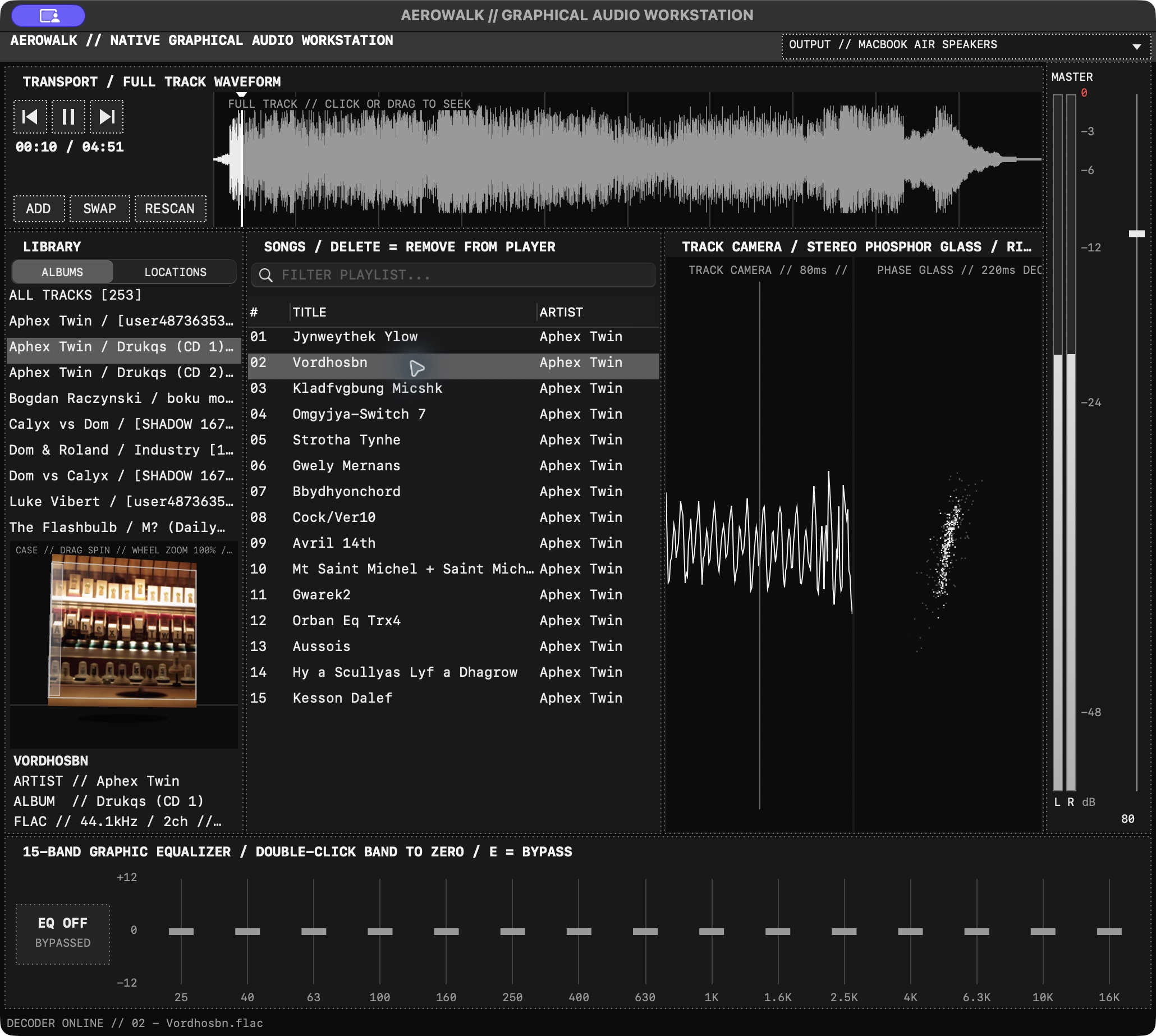
aerowalk plays the music files on my mac, ive got a native window with the library, artwork and scopes in front of me, theres also a version that runs entirely in the terminal, both are written in swift and use avfoundation for audio
the visual side got a bit out of hand, a waveform across the top, a moving close-up of the track, stereo dots hanging around like phosphor, the album cover sitting in a little case i can rotate, i like having something to look at while listening
the player · audio and scopes · the library · terminal version
the player
theres an earlier web prototype in the project, the current desktop app is appkit, custom views draw the controls and scopes, avfoundation opens the files and handles playback, it runs locally without an account or a server
i can add a folder or drop files in from finder, browse by album and filter the track list, the metadata and embedded artwork come from the files, wav, mp3 and flac are supported
the keyboard still does most of what i need, j and k move through tracks, enter plays, space pauses, n and p go forward and back, brackets seek, slash gets me into search, i can use the mouse whenever thats easier
the artwork has its own little perspective scene, it can be spun and zoomed, then theres a fifteen-band eq along the bottom and an output selector at the top, i can pick the audio device from inside the player
the waveform is actually the track
the long waveform is decoded from the whole file, the analyser reads the audio in chunks and reduces it to a display-sized set of values, click or drag across it and playback jumps to that position
the track camera is a different view, a much smaller window moving through decoded samples around the playback position, i can change the time window and gain to get closer to whats happening, the overview tells me where i am in the track, the close-up gets into the shape
the stereo scope uses samples from the live output, left on one axis and right on the other, it keeps a short history of points and fades them away, changing the decay changes how long the shape hangs around, i can swap the two scope positions too
local audio file
       |
       +--- decoded overview and track camera
       |
       v
player node
       |
       v
fifteen-band eq
       |
       v
main mixer --- stereo samples --- scope and meters
       |
       v
selected audio output
the eq runs from 25 hz to 16 khz, each control changes a parametric band in avfoundation, double-clicking a band returns it to zero, e bypasses the eq, the output tap is after that processing so the live stereo scope follows the processed signal
the scope samples sit in separate left and right ring buffers, the interface takes snapshots to draw them, theres locking around that exchange in this build, the display work and the slower text and transport updates have separate timing
getting the boring bits right
opening a player should get me back to my music, the app restores the saved library on launch, it doesnt go crawling through all my folders again, rescan only checks locations ive explicitly added
removing something from the player leaves the actual audio file alone, it remembers that removal too, otherwise the next rescan would just put everything back, explicitly adding the file or folder again restores those entries
overlapping folders were another detail, if ive added a parent folder and a folder inside it, removing one location should keep tracks still covered by the other, paths are normalised and symlinks resolved so the same file doesnt keep appearing under different names
imports, rescans and removals can be undone, a whole import counts as one action, undoing while an import is running cancels the scan and discards queued results, the history holds up to forty actions for the current session, the resulting library is saved after each change
even search needs its own undo behaviour, if im typing a filter and press undo i want to undo that text, not remove the album i imported a minute ago, there are tests around that, multiple selection, overlapping locations and keeping files intact
the terminal version
the terminal player is a separate swift executable, the interface is drawn with ansi control codes and ascii characters, playback still goes through avfoundation, album groups, track navigation and visualisations all fit into one screen that adapts to the terminal size
it has an inverse scope, a phase orbit and a signal-density view, v cycles through them, q exits and restores the shell, i can point it at individual files or folders, without a path it starts in my music folder
theres also a broader scan mode, that one tries to keep obvious sample-library folders and audio under forty-five seconds out of the listening library, the filter can be disabled, its a practical heuristic and it will miss some short tracks
where its at
this page covers the native mac build on this machine in november 2026, its a personal project still being worked on, built with coding assistance and a lot of fiddling with how it feels to use
the saved test run has twelve passing library and selection checks, that covers things like undo, import cancellation and leaving the original files alone, theres still plenty of listening and everyday use to do
patternforge is where i make tracks, afterimage is a synth, aerowalk is where the same obsession ended up on the listening side, more of that on the music page